# LOD

## Object Builder equivalents

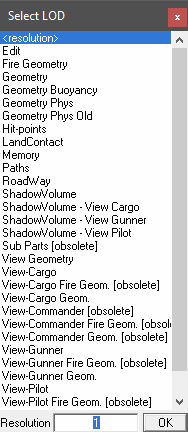
<figure><img src="https://418903991-files.gitbook.io/~/files/v0/b/gitbook-x-prod.appspot.com/o/spaces%2FNJv4RINtC1OtMV3u9E73%2Fuploads%2FVa4l7zcHlUwu9V5QuA32%2Fimage.png?alt=media&#x26;token=8ea2b7d9-ba9b-48f1-8db0-9924d541c650" alt="Object Builder select LOD"><figcaption></figcaption></figure>

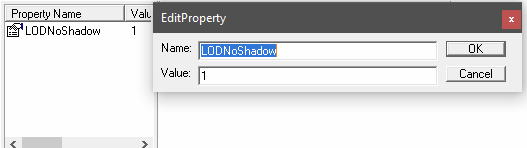
<figure><img src="https://418903991-files.gitbook.io/~/files/v0/b/gitbook-x-prod.appspot.com/o/spaces%2FNJv4RINtC1OtMV3u9E73%2Fuploads%2FHL2wQrkyoMDng5b2UWM8%2Fimage.png?alt=media&#x26;token=fb14f6de-f4fa-47ab-ad12-0f9bbeba420f" alt="Object Builder named properties"><figcaption></figcaption></figure>

***

## Location

The panel is visible for all mesh objects in the Object Data Properties of the Properties editor.

***

## Properties

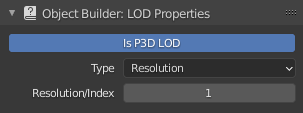
<figure><img src="https://418903991-files.gitbook.io/~/files/v0/b/gitbook-x-prod.appspot.com/o/spaces%2FNJv4RINtC1OtMV3u9E73%2Fuploads%2F3nh2txvX4JdhYZqXtbim%2Fproperties_lod_panel.png?alt=media&#x26;token=388a26eb-f4b6-4753-a26a-7d93582fea09" alt="LOD properties"><figcaption></figcaption></figure>

### Is P3D LOD

Enables mesh object for export to P3D, as well as further LOD properties.

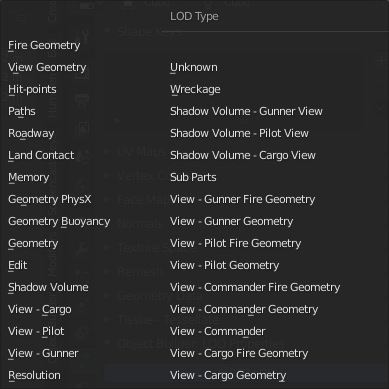
### Type

Type of LOD.

<figure><img src="https://418903991-files.gitbook.io/~/files/v0/b/gitbook-x-prod.appspot.com/o/spaces%2FNJv4RINtC1OtMV3u9E73%2Fuploads%2Fm0TYqaeDJq000MruudUI%2Fimage.png?alt=media&#x26;token=38732af0-59fe-4864-bc9d-1092e7b3bbb6" alt="LOD types"><figcaption></figcaption></figure>

### Resolution/Index

Resolution/index of LOD. This property is not available for all LOD types.

### Named Properties

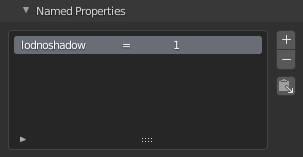
<figure><img src="https://418903991-files.gitbook.io/~/files/v0/b/gitbook-x-prod.appspot.com/o/spaces%2FNJv4RINtC1OtMV3u9E73%2Fuploads%2Fs2ol9RTl0J8CMV62hZik%2Fproperties_lod_namedprops.png?alt=media&#x26;token=8cdcdca4-52b9-4535-8a77-4416fc2c24af" alt="Named properties"><figcaption></figcaption></figure>

Named properties are displayed in a list. Items can be added and removed with the "+" and "-" buttons. Names and values can be edited by double clicking them in the list.

#### Common Named Properties

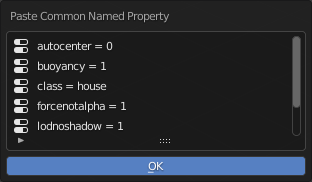
Common named properties can be added through the "Paste Common Named Property" button. Properties can be added from a predefined list of values.

<figure><img src="https://418903991-files.gitbook.io/~/files/v0/b/gitbook-x-prod.appspot.com/o/spaces%2FNJv4RINtC1OtMV3u9E73%2Fuploads%2FJ7RtkKnSiTPTtoukDMyN%2Fproperties_lod_nameprops_common.png?alt=media&#x26;token=f375a5ed-ac23-4786-81a2-182717bd154e" alt="Common named properties"><figcaption></figcaption></figure>

It is possible to add personal items to the list through the [custom data](https://mrcmodding.gitbook.io/arma-3-object-builder/general/custom-data-json) JSON file.

### Proxy Access

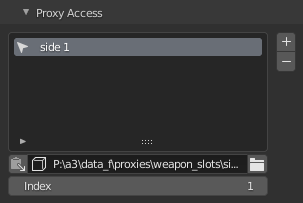
<figure><img src="https://418903991-files.gitbook.io/~/files/v0/b/gitbook-x-prod.appspot.com/o/spaces%2FNJv4RINtC1OtMV3u9E73%2Fuploads%2Fe5nk64DGLmVVEJvpJkpS%2Fproperties_lod_proxies.png?alt=media&#x26;token=7d8e05f2-a637-4a40-a032-23f6680cdd2f" alt=""><figcaption></figcaption></figure>

Quick access panel to all proxy objects linked to the current LOD object.

### Copies

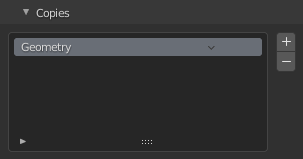
<figure><img src="https://418903991-files.gitbook.io/~/files/v0/b/gitbook-x-prod.appspot.com/o/spaces%2FNJv4RINtC1OtMV3u9E73%2Fuploads%2FOtnps4WzAffveiIVlpRd%2Fproperties_lod_copies.png?alt=media&#x26;token=f89f494a-baec-42db-b077-ad74093bf6cb" alt=""><figcaption></figcaption></figure>

List of LOD copy directives. Geometry component generation and validation during P3D export takes the copies into consideration.


---

# Agent Instructions: Querying This Documentation

If you need additional information that is not directly available in this page, you can query the documentation dynamically by asking a question.

Perform an HTTP GET request on the current page URL with the `ask` query parameter:

```
GET https://mrcmodding.gitbook.io/arma-3-object-builder/properties/lod.md?ask=<question>
```

The question should be specific, self-contained, and written in natural language.
The response will contain a direct answer to the question and relevant excerpts and sources from the documentation.

Use this mechanism when the answer is not explicitly present in the current page, you need clarification or additional context, or you want to retrieve related documentation sections.